
jquery file upload是一款实用的上传文件插件,项目中刚好用到,在这里记录分享一下(本文附带教程以及源码下载)
jQuery File Upload 是一个Jquery图片上传组件,支持多文件上传、取消、删除,上传前缩略图预览、列表显示图片大小,支持上传进度条显示;支持各种动态语言开发的服务器端。
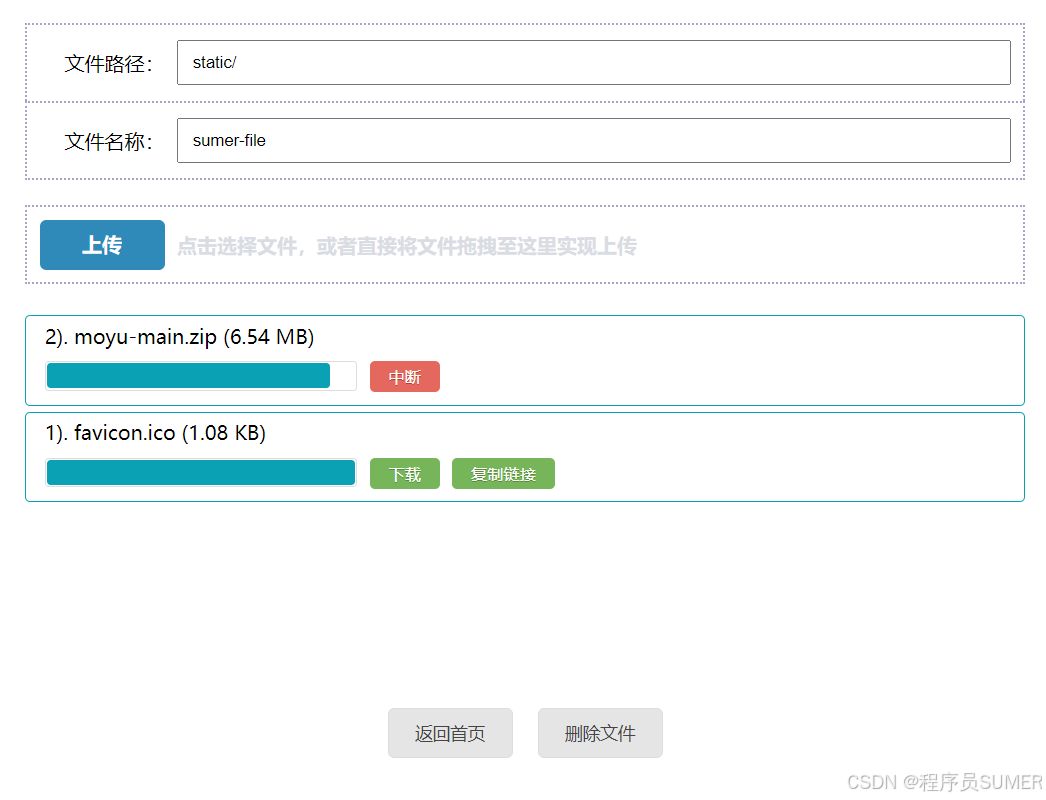
jquery-upload-file示例
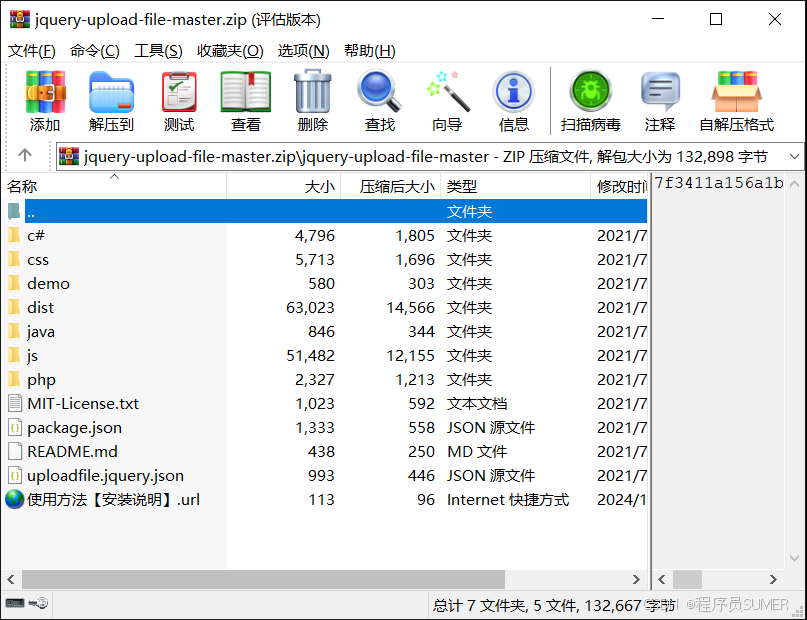
支持jquery + html + 多种后端语言,组合,C#,.NET,JAVA,PHP, node.js,甚至python 都支持
源码下载:
下载地址:点击下载
示例演示:
演示地址:点击前往
使用教程:
一、准备相关js文件
jquery file upload 下载地址:点击打开链接
二、导入js文件
注意:js文件引入的先后顺序不可以乱
<script src="https://code.jquery.com/jquery-3.2.1.min.js"></script>
<!-- jquery file upload相关js -->
<script src="js/jquery.ui.widget.js"></script>
<script src="js/jquery.iframe-transport.js"></script>
<script src="js/jquery.fileupload.js"></script>
<script src="js/jquery.fileupload-process.js"></script>
<script src="js/jquery.fileupload-validate.js"></script>
三、jsp代码
<style>
/* input样式 */
#uploadImg{
display: none;
}

/* button样式 */
#chooseFile{
background: #93b6fc;
}

#uploadFile,#rechooseFile {
display: none;
background: #93b6fc;
}

#image{
  width:200px;
  height:200px;
}

/* 进度条样式 */
.bar {
 background-image: -webkit-linear-gradient(top,#5cb85c 0,#449d44 100%);
 background-image: -o-linear-gradient(top,#5cb85c 0,#449d44 100%);
 background-image: -webkit-gradient(linear,left top,left bottom,from(#5cb85c),to(#449d44));
 background-image: linear-gradient(to bottom,#5cb85c 0,#449d44 100%);
 filter: progid:DXImageTransform.Microsoft.gradient(startColorstr='#ff5cb85c', endColorstr='#ff449d44', GradientType=0);
 background-repeat: repeat-x;
 height: 20px;
 line-height: 20px;
 -webkit-box-shadow: inset 0 -1px 0 rgba(0,0,0,.15);
 box-shadow: inset 0 -1px 0 rgba(0,0,0,.15);
 -webkit-transition: width .6s ease;
 -o-transition: width .6s ease;
 transition: width .6s ease;
}
#progress {
 filter: progid:DXImageTransform.Microsoft.gradient(startColorstr='#ffebebeb', endColorstr='#fff5f5f5', GradientType=0);
 background-repeat: repeat-x;
 height: 20px;
 width: 0%;
 margin-bottom: 20px;
 overflow: hidden;
 background-color: #f5f5f5;
 border-radius: 4px;
 -webkit-box-shadow: inset 0 1px 2px rgba(0,0,0,.1);
 box-shadow: inset 0 1px 2px rgba(0,0,0,.1);
 margin-top: 20px;
}
</style>
<body>
    <div class="jquery-fileupload">
        <div class="">
            <input id="uploadImg" type="file" name="uploadImg" multiple style="display: none" />
                <button id="chooseFile">+选择文件</button>
                <button id="uploadFile">~开始上传</button>
                <button id="rechooseFile">+重新选择</button>
        </div>
        <div>
            <img id="image" src="">
        </div>
        <div id="progress">
            <div class="bar" style="width: 0%;"></div>
        </div>
    </div>
</body>
四、js代码
$(function() {

        $("#chooseFile").on("click", function() {
            $("#uploadImg").click();
        });

        $('#uploadImg').fileupload({
            url : '/FileTest/upload',//请求发送的目标地址
            Type : 'POST',//请求方式 ,可以选择POST,PUT或者PATCH,默认POST
            //dataType : 'json',//服务器返回的数据类型
            autoUpload : false,
            acceptFileTypes : /(gif|jpe?g|png)$/i,//验证图片格式
            maxNumberOfFiles : 1,//最大上传文件数目
            maxFileSize : 1000000, // 文件上限1MB
            minFileSize : 100,//文件下限  100b
            messages : {//文件错误信息
                acceptFileTypes : '文件类型不匹配',
                maxFileSize : '文件过大',
                minFileSize : '文件过小'
            }
        })
        //图片添加完成后触发的事件
        .on("fileuploadadd", function(e, data) {
            //validate(data.files[0])这里也可以手动来验证文件格式和大小

            //隐藏或显示页面元素
            $('#progress .bar').css(
                'width', '0%'
              );
            $('#progress').hide();
            $("#chooseFile").hide();
            $("#uploadFile").show();
            $("#rechooseFile").show();

            //获取图片路径并显示
            var url = getUrl(data.files[0]);
            $("#image").attr("src", url);

            //绑定开始上传事件
            $('#uploadFile').click(function() {
                $("#uploadFile").hide();
                jqXHR = data.submit();
                //解绑,防止重复执行
                $("#uploadFile").off("click");
            })

            //绑定点击重选事件
            $("#rechooseFile").click(function(){
                $("#uploadImg").click();
                //解绑,防止重复执行
                $("#rechooseFile").off("click");
            })
        })
        //当一个单独的文件处理队列结束触发(验证文件格式和大小)
        .on("fileuploadprocessalways", function(e, data) {
            //获取文件
            file = data.files[0];
            //获取错误信息
            if (file.error) {
                console.log(file.error);
                $("#uploadFile").hide();
            }
        })
        //显示上传进度条
        .on("fileuploadprogressall", function(e, data) {
            $('#progress').show();
             var progress = parseInt(data.loaded / data.total * 100, 10);
              $('#progress').css(
               'width','15%'
              );
              $('#progress .bar').css(
               'width',progress + '%'
              );
        })
        //上传请求失败时触发的回调函数
        .on("fileuploadfail", function(e, data) {
            console.log(data.errorThrown);
        })
        //上传请求成功时触发的回调函数
        .on("fileuploaddone", function(e, data) {
            alert(data.result);

        })
        //上传请求结束后,不管成功,错误或者中止都会被触发
        .on("fileuploadalways", function(e, data) {

        })


        //手动验证
        function validate(file) {
            //获取文件名称
            var fileName = file.name;
            //验证图片格式
            if (!/.(gif|jpg|jpeg|png|gif|jpg|png)$/.test(fileName)) {
                console.log("文件格式不正确");
                return true;
            }
            //验证excell表格式
            /*  if(!/.(xls|xlsx)$/.test(fileName)){
                alert("文件格式不正确");
                return true;
             } */

            //获取文件大小
            var fileSize = file.size;
            if (fileSize > 1024 * 1024) {
                alert("文件不得大于一兆")
                return true;
            }
            return false;
        }

        //获取图片地址
        function getUrl(file) {
            var url = null;
            if (window.createObjectURL != undefined) {
                url = window.createObjectURL(file);
            } else if (window.URL != undefined) {
                url = window.URL.createObjectURL(file);
            } else if (window.webkitURL != undefined) {
                url = window.webkitURL.createObjectURL(file);
            }
            return url;
        }

    });
五、服务器端代码
php版本:
<?php
$output_dir = "uploads/";
if(isset($_FILES["myfile"]))
{
    $ret = array();

//    This is for custom errors;
/*    $custom_error= array();
    $custom_error['jquery-upload-file-error']="File already exists";
    echo json_encode($custom_error);
    die();
*/
    $error =$_FILES["myfile"]["error"];
    //You need to handle  both cases
    //If Any browser does not support serializing of multiple files using FormData()
    if(!is_array($_FILES["myfile"]["name"])) //single file
    {
         $fileName = $_FILES["myfile"]["name"];
         move_uploaded_file($_FILES["myfile"]["tmp_name"],$output_dir.$fileName);
        $ret[]= $fileName;
    }
    else  //Multiple files, file[]
    {
      $fileCount = count($_FILES["myfile"]["name"]);
      for($i=0; $i < $fileCount; $i++)
      {
        $fileName = $_FILES["myfile"]["name"][$i];
        move_uploaded_file($_FILES["myfile"]["tmp_name"][$i],$output_dir.$fileName);
        $ret[]= $fileName;
      }

    }
    echo json_encode($ret);
 }
 ?>
java版本:
import java.util.Iterator;

import org.springframework.stereotype.Controller;
import org.springframework.web.bind.annotation.RequestMapping;
import org.springframework.web.bind.annotation.RequestMethod;
import org.springframework.web.multipart.MultipartFile;
import org.springframework.web.multipart.MultipartHttpServletRequest;

@Controller
public class FileUploadController {

    @RequestMapping(value="/upload", method=RequestMethod.POST)
        public String handleFileUpload(MultipartHttpServletRequest request){
            Iterator<String> iterator = request.getFileNames();

            while (iterator.hasNext()) {
                    String fileName = iterator.next();
                    MultipartFile multipartFile = request.getFile(fileName);
                    byte[] file = multipartFile.getBytes();

                    // do stuff...

            }

            // do stuff...

        }
}
C#版本:
using System;
using System.IO;
using System.Web;
using System.Web.Mvc;

namespace jQuery_Upload_File_Plugin_DotNet.Controllers
{
    /*
     * C# implementation example
     * Developed by Aleixo Porpino Filho
    */
    public class HomeController : Controller
    {
        public ActionResult Index()
        {
            return View();
        }

        [HttpPost]
        public ActionResult UploadFile()
        {
            try
            {
                HttpPostedFileBase hpf = HttpContext.Request.Files["file"] as HttpPostedFileBase;
                string tag = HttpContext.Request.Params["tags"];// The same param name that you put in extrahtml if you have some.
                string category = HttpContext.Request.Params["category"];

                DirectoryInfo di = Directory.CreateDirectory(Server.MapPath("~/Tmp/Files"));// If you don't have the folder yet, you need to create.
                string sentFileName = Path.GetFileName(hpf.FileName); //it can be just a file name or a user local path! it depends on the used browser. So we need to ensure that this var will contain just the file name.
                string savedFileName = Path.Combine(di.FullName, sentFileName);
                hpf.SaveAs(savedFileName);

                var msg = new { msg = "File Uploaded", filename = hpf.FileName, url= savedFileName };
                return Json(msg);
            }
            catch (Exception e)
            {
                //If you want this working with a custom error you need to change in file jquery.uploadfile.js, the name of
                //variable customErrorKeyStr in line 85, from jquery-upload-file-error to jquery_upload_file_error
                var msg = new { jquery_upload_file_error = e.Message };
                return Json(msg);
            }
        }
        [Route("{url}")]
        public ActionResult DownloadFile(string url)
        {
            return File(url, "application/pdf");
        }

        [HttpPost]
        public ActionResult DeleteFile(string url)
        {
            try
            {
                System.IO.File.Delete(url);
                var msg = new { msg = "File Deleted!" };
                return Json(msg);
            }
            catch (Exception e)
            {
                //If you want this working with a custom error you need to change the name of
                //variable customErrorKeyStr in line 85, from jquery-upload-file-error to jquery_upload_file_error
                var msg = new { jquery_upload_file_error = e.Message };
                return Json(msg);
            }
        }
    }
}
源码下载:
下载地址:点击下载
示例演示:
演示地址:点击前往
参考文献:
1、基于Uni-app前端框架的SUMER UI3.0组件库
2、uniapp精仿支付宝UI界面源码下载,基于SumerUI一款仿支付宝APP
3、uniapp精仿微信源码,基于SumerUI一款仿微信APP应用
SUMER UI【用于开发APP、小程序、H5网站、毕业设计…】
评论